Remember the days of flipping through channels, beholden to a broadcaster's schedule? It feels like another lifetime. Today, your entertainment universe is boundless, accessible at your command, and dictated by your preferences. But with so many options for streaming on various devices & operating systems, how do you cut through the noise and pick the right tools for your digital adventures?
Navigating the world of streaming gadgets can feel like deciphering ancient hieroglyphs, each promising the ultimate viewing experience. From sleek Apple TV boxes to versatile Roku sticks and powerful Nvidia Shields, every device boasts unique features and caters to different users. Our goal here isn't just to list specs; it's to arm you with the knowledge to confidently choose the streaming powerhouse that perfectly aligns with your lifestyle, budget, and viewing habits.
At a Glance: Your Streaming Device Cheat Sheet
- Dedicated streaming devices are powerful upgrades: They turn any TV into a smart TV, often outperforming built-in smart TV apps.
- Picture quality matters: Prioritize devices supporting 4K UHD and multiple HDR formats (HDR10, Dolby Vision) for the best visuals.
- Operating system is your guide: Roku OS, tvOS, Android TV, and Fire OS each offer a distinct user experience and app ecosystem.
- Connectivity is key: Robust Wi-Fi (dual-band or Wi-Fi 6E) is essential, but Ethernet ensures stable, high-resolution streams.
- Consider your ecosystem: Apple users will love Apple TV 4K, Google fans prefer Chromecast, and Amazon loyalists benefit from Fire TV.
- Budget options deliver: You don't need to break the bank for excellent 4K HDR streaming, thanks to devices like the Roku Streaming Stick 4K.
- Future-proofing pays off: Choose devices that receive regular software updates and support emerging standards.
The Streaming Revolution: Why Dedicated Devices Still Lead the Pack
Gone are the days when a “smart TV” simply meant a TV with Netflix built-in. Today's streaming devices are sophisticated hardware units, designed from the ground up to deliver a superior on-demand media experience. They’re essentially mini-computers optimized for video and audio playback, plugging into your TV via HDMI and connecting to your home internet, typically via Wi-Fi or Ethernet.
While many new televisions come with integrated smart platforms, dedicated streaming devices often offer a smoother, faster, and more feature-rich experience. They bypass the often-underpowered processors and aging software found in many smart TVs, providing snappier navigation, more frequent software updates, and superior support for the latest visual and audio standards like 4K, HDR (HDR10, HDR10+, Dolby Vision, HLG), and immersive soundscapes like Dolby Atmos. Think of it as upgrading from a general-purpose family sedan to a finely tuned sports car built for performance. This specialized approach ensures an optimized viewing journey that simply makes your content look and sound better.
They've radically altered how we consume media, offering a personalized, on-demand alternative to traditional broadcast schedules. This flexibility and cost-effectiveness have presented a significant challenge to traditional cable and satellite services, making it easier than ever to watch movies and TV shows on your own terms.
Navigating the Streaming Jungle: Key Considerations for Your Choice
Choosing the right streaming device isn't just about picking the most expensive or the one with the flashiest marketing. It's about finding the perfect fit for you. Here’s what truly matters:
Visual Fidelity: Resolution and HDR Support
This is where your eyes do the talking. The jump from HD to 4K Ultra HD (UHD) delivers incredible detail, but it's only half the story. High Dynamic Range (HDR) is arguably even more impactful, offering brighter whites, deeper blacks, and a wider, more vibrant color palette.
- 4K UHD: The current standard for high-resolution content. Most modern devices support it.
- HDR Formats: This is crucial.
- HDR10: The baseline, widely supported format.
- Dolby Vision: Often considered the premium HDR format, offering dynamic metadata that optimizes brightness and contrast scene-by-scene.
- HDR10+: Samsung's answer to Dolby Vision, also using dynamic metadata.
- HLG (Hybrid Log-Gamma): Primarily used for live broadcast HDR content.
Your Action: Ensure your chosen device supports not just 4K, but also the HDR formats relevant to the content you want to watch and the TV you own. If your TV supports Dolby Vision, you'll want a device that also supports it to get the best picture quality. Understanding the intricacies of 4K and HDR technologies can make a huge difference in your viewing experience.
The Brains Behind the Screen: Operating System and User Interface
The OS is the soul of your streaming device. It dictates how you navigate, find content, and interact with your entertainment. Each major player offers a distinct flavor:
- Roku OS: Praised for its simplicity and neutrality. It prioritizes content over platform, making it easy to find what you want without pushing a specific ecosystem. Great for users who want minimal fuss.
- tvOS (Apple TV): Polished, sleek, and deeply integrated into the Apple ecosystem. If you're an iPhone, iPad, or Mac user, the seamless experience and AirPlay 2 support are huge draws.
- Android TV / Google TV: A robust platform that offers deep integration with Google services (Google Assistant, YouTube) and personalized recommendations. Google TV, a newer skin over Android TV, emphasizes content discovery across all your apps. Ideal for Android phone users and smart home enthusiasts.
- Fire OS (Amazon Fire TV): Built on Android, but heavily customized by Amazon. It’s tightly integrated with Amazon Prime Video, Alexa, and other Amazon services. Best for those already immersed in the Amazon ecosystem.
Your Action: Consider which interface feels most intuitive to you and which ecosystem you're already invested in.
Your Content Universe: App and Service Availability
What good is a powerful device if it can't access your favorite shows? While most major platforms (Netflix, Disney+, Hulu, Amazon Prime Video) are universally available, some niche apps or regional services might be exclusive to certain operating systems. Also, look for comprehensive free content offerings like The Roku Channel, Pluto TV, or Tubi.
Your Action: Make a list of your must-have streaming services. Then, double-check that your prospective device supports them all. This is a critical step in navigating the vast landscape of streaming services effectively.
Staying Connected: Connectivity Options
Your streaming device is only as good as its connection to the internet.
- Wi-Fi: Most devices rely on Wi-Fi. Dual-band Wi-Fi (supporting both 2.4GHz and 5GHz) is standard, with newer devices like the Fire TV Stick 4K Max offering Wi-Fi 6E for even faster, more stable connections, especially in crowded networks.
- Ethernet: For the most stable and reliable high-resolution streaming, especially 4K, an Ethernet port is king. It eliminates Wi-Fi interference and bandwidth fluctuations, guaranteeing a smooth experience. The Apple TV 4K (higher tier) and Nvidia Shield include it; others might require an adapter (like Chromecast with Google TV).
- Bluetooth: Useful for connecting peripherals like headphones, game controllers, or keyboards.
Your Action: If possible, opt for Ethernet for your primary streaming hub. For other devices, ensure robust dual-band Wi-Fi. You might also consider optimizing your home Wi-Fi for streaming to get the most out of your devices.
Beyond the Basics: Voice Control, Gaming, and Smart Home
These extra features can significantly enhance your experience:
- Voice Control: Most premium devices now offer voice remotes, allowing you to search for content, control playback, or even open apps with simple spoken commands. Apple TV has Siri, Chromecast has Google Assistant, and Fire TV has Alexa. Understanding how voice control streamlines your viewing can truly transform your interaction with your entertainment.
- Gaming: Some devices (like the Nvidia Shield and Apple TV 4K) are powerful enough to offer casual gaming or even cloud gaming services like Nvidia GeForce Now or Apple Arcade.
- Smart Home Integration: Devices within the Google or Amazon ecosystems often integrate seamlessly with smart home devices, allowing you to control lights, cameras, and thermostats directly from your TV remote or via voice commands.
Your Action: Decide which of these "nice-to-have" features are essential for your daily use.
The Contenders: Top Streaming Devices Reviewed
Now, let's dive into the specifics of the leading players, helping you pinpoint the best fit.
Apple TV 4K (late 2022 / 3rd Generation): Best Overall
- Core Strengths: Unparalleled user experience, superior streaming quality, seamless integration with the Apple ecosystem, impressive hardware longevity.
- Price: Starts at $129; the Wi-Fi + Ethernet model is $149.
- Key Specs/Features: Powered by the A15 Bionic chip (the same chip in some iPhones) for blazing-fast performance (50% faster CPU, 30% faster GPU, 30% less power). Supports 4K resolution, HDR10+, Dolby Vision, and high frame rate HDR for stunning visuals. The USB-C Siri Remote offers intuitive gesture support. Runs on tvOS 17, bringing features like FaceTime on your TV and a revamped Control Center. The $149 model adds Gigabit Ethernet and Thread/Matter support for advanced smart home capabilities.
- Content/Ecosystem: Access to an extensive app library, live TV, and deep integration with Apple services (Apple TV+, Fitness+, Music, Arcade), AirPlay 2 for casting, and HomeKit device control.
- Pros: Lightning-fast performance, exceptional audio/video quality, refined Siri remote, rich features, and a lower price than its predecessors.
- Cons: Higher price point than competitors, some features are exclusive to Apple users, and it surprisingly doesn't include an HDMI or USB-C cable.
Who it's for: Apple loyalists seeking the pinnacle of streaming performance, quality, and ecosystem integration. If you want the fastest, smoothest experience and value long-term support, this is your device.
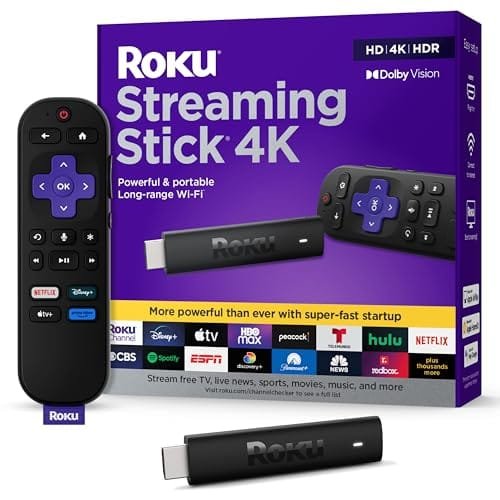
Roku Streaming Stick 4K: Best Budget Overall
- Core Strengths: Offers an impressive combination of performance, expansive content support, user-friendly interface, and unbeatable affordability.
- Price: Typically $49.99, often discounted to $39.00.
- Key Specs/Features: Delivers vibrant 4K UHD output with comprehensive HDR compatibility (HDR10, HDR10+, Dolby Vision, HLG). It even boasts near-4K upscaling for lower-resolution content. Features built-in Dual-Band Wi-Fi 5 and supports voice control via Google Assistant, Alexa, or Siri. Comes with an All-in-One Voice Remote that controls your TV's power and volume.
- Content: Access to over 4,000 different streaming services and apps, including all major subscription platforms (Netflix, Hulu, Disney+, Amazon Prime Video) and a wealth of free content channels (The Roku Channel, Pluto TV, Tubi, Crackle, Xumo, Fawesome).
- Pros: Outstanding 4K HDR image quality (including Dolby Vision), quick device performance, incredibly user-friendly interface, and effective voice-enabled search.
- Cons: Lacks native Dolby Atmos support (though it can pass through Dolby Digital/Plus).
Who it's for: Anyone seeking excellent 4K HDR streaming without breaking the bank. Perfect for users who prioritize simplicity, wide app support, and a neutral platform.
Roku Express 4K: Best Value Option
- Core Strengths: A truly budget-friendly option that surprisingly delivers 4K HDR content, features dual-band Wi-Fi, and provides access to a vast array of apps and services through Roku's simple user interface.
- Price: $39.99/£39.99.
- Key Specs/Features: Outputs crisp visuals in 4K UHD with enhanced quality from HDR10 and HDR10+. Features an easy-to-use simple remote (not a voice remote), private listening capabilities via the Roku app, and supports Apple AirPlay 2 for casting content from Apple devices.
- Content: Access to major platforms like Netflix, Disney Plus, Spotify, Apple TV, Amazon Prime Video, alongside The Roku Channel for a plethora of free content.
- Pros: Vibrant picture quality (HDR10, HDR10+, HLG), comprehensive streaming service selection, user-friendly companion app, and incredibly affordable 4K HDR streaming.
- Cons: No voice remote included (must use the app for voice control), lacks Dolby Vision support, and the basic remote requires a direct line of sight to the device.
Who it's for: Price-conscious buyers who want 4K HDR and a simple interface but don't need voice control directly on the remote or Dolby Vision. Ideal for a secondary TV or guest room.
Chromecast with Google TV 4K: Best for Android TV
- Core Strengths: Integrates seamlessly with the Android TV platform and the wider Google ecosystem, offering personalized recommendations and robust smart home device integration.
- Key Specs/Features: Supports up to 4K HDR resolution at 60 fps with comprehensive HDR support (Dolby Vision, HDR10/10+, HLG). Offers superior audio capabilities with Dolby Digital, Dolby Digital Plus, and Dolby Atmos via HDMI passthrough. It comes with 2 GB of RAM, a dedicated Voice Remote with Google Assistant, and offers Ethernet support via a separate, optional adapter.
- Content: Aggregates a broad range of apps and services, allowing users to browse over 700,000 movies and TV episodes from platforms like Netflix, Amazon Prime Video, Disney+, and YouTube in stunning 4K HDR. The Google TV interface prioritizes content discovery.
- Pros: Compact design that hides behind your TV, superior remote control compared to older Chromecasts, supports Ultra-HD, Dolby Vision, and Dolby Atmos, simple setup, and strong integration with smart home technologies.
- Cons: Relatively high price point, and the home screen can sometimes feel a bit busy with too many recommendations.
Who it's for: Android users, Google Home/Assistant users, and anyone who wants a content-first interface with strong personalization and smart home control.
Nvidia Shield (2019): Next-Best Streaming Device (Great for Gamers)
- Core Strengths: A powerful Android TV platform renowned for its robust performance, especially appealing to gamers and tech enthusiasts. Benefits from continuous long-term support with frequent software updates, ensuring exceptional longevity.
- Key Specs/Features: Powered by the Tegra X1+ processor, making it a true powerhouse. Both the standard 'Tube' and 'Pro' models support Dolby Vision and Dolby Atmos decoding. The Pro version offers more RAM and 16GB of storage, making it particularly well-suited for local media server functions (Plex) and intensive gaming via Nvidia's GeForce Now cloud gaming system. It also features AI upscaling for non-4K content.
- Pros: Exceptional longevity due to powerful hardware and consistent updates, fantastic for gamers, best-in-class upscaling, and advanced media server capabilities.
- Cons: Higher price point, and the interface, while Android TV, isn't as tailored for simple content discovery as Google TV or Roku OS.
Who it's for: Gamers, tech enthusiasts, those with extensive local media libraries, and users who demand the absolute best performance and long-term support from an Android TV device.
Amazon Fire TV Stick 4K Max: Also Great (for Amazon Users)
- Core Strengths: The ideal choice for users who prefer the native Amazon and Alexa experience, offering faster internals (with Wi-Fi 6E support) and comprehensive content integration within the Amazon ecosystem.
- Key Specs/Features: Supports 4K resolution, Dolby Vision, and Dolby Atmos for a premium audiovisual experience. It ships with the latest Alexa Voice Remote, which includes television controls (power, volume) but notably not hands-free voice access directly from the device itself.
- Content: Provides direct access to Amazon Prime Video and a vast selection of third-party streaming apps and games from the Amazon Appstore.
- Pros: Strong integration with Amazon services and the Alexa voice assistant, Wi-Fi 6E support for faster wireless performance, and a comprehensive content library.
- Cons: The home screen can feel quite busy and heavily biased towards Amazon content. Occasional lag in performance can occur, especially if many apps are open.
Who it's for: Dedicated Amazon Prime subscribers, Alexa smart home users, and those who prioritize Amazon's content and services.
Google TV Streamer (Chromecast Replacement / Future Release)
- Core Strengths: This updated iteration, poised to potentially replace or significantly evolve the Chromecast with Google TV experience, focuses on an improved remote with a "lost-remote finder" and enhanced smart home capabilities.
- Key Specs/Features: Anticipated to include Thread and Matter support, allowing for seamless control of smart home devices like cameras, lights, and temperature sensors directly via the TV remote. Expect a continuation of the Google TV interface and app ecosystem.
- Experience: Expected to offer a similar experience to the current Chromecast with Google TV, including the same array of apps and a potentially busy home screen focused on recommendations.
Who it's for: Early adopters and smart home enthusiasts deeply invested in the Google ecosystem, looking for the very latest smart home integrations through their TV.
Making the Smart Choice: Actionable Insights for Your Setup
With a solid understanding of the top devices, let's distill this into practical advice for your purchase.
What's Your Budget?
Streaming devices range from under $40 to well over $100.
- Entry-level: Roku Express 4K ($39.99) or Fire TV Stick 4K Max (often discounted) deliver excellent 4K HDR for less.
- Mid-range: Roku Streaming Stick 4K ($49.99) or Chromecast with Google TV 4K ($49.99) balance price and features.
- Premium: Apple TV 4K ($129+) and Nvidia Shield ($149+) offer top-tier performance but come at a higher cost.
Factor in not just the device's initial cost, but also potential subscriptions and in-app purchases.
Which Ecosystem Do You Live In?
This is often the most significant deciding factor.
- Apple: If you own iPhones, iPads, Macs, and use Apple services (Apple TV+, Apple Music, iCloud), the Apple TV 4K offers unparalleled integration.
- Google/Android: If your phone is Android, you use Google Assistant, YouTube, and Google Photos, Chromecast with Google TV is a natural fit.
- Amazon/Alexa: Prime subscribers and those with Alexa smart home devices will find Fire TV Sticks most convenient.
- Agnostic/Simple: If you don't care about a specific brand ecosystem and just want to stream, Roku's neutral platform is hard to beat.
How Will You Use It?
- Casual viewing/Background noise: Simpler, cheaper options like the Roku Express 4K are perfectly adequate.
- Serious movie/TV watching: Prioritize 4K HDR (especially Dolby Vision) and stable connectivity (Ethernet). Apple TV 4K, Roku Streaming Stick 4K, and Chromecast with Google TV 4K excel here.
- Gaming: Nvidia Shield is the king for more serious gaming, with Apple TV 4K offering a strong casual gaming experience.
- Media server/Advanced user: Nvidia Shield's local Plex server capabilities are unmatched.
Current Setup Compatibility
- TV: Does your TV support 4K? Which HDR formats (HDR10, Dolby Vision)? There's no point in buying a Dolby Vision-capable device if your TV only does HDR10.
- Audio System: Do you have a soundbar or AV receiver that supports Dolby Atmos or DTS:X? Ensure your streaming device can pass through these audio formats.
The Hardware Reality
- Ports: Do you have a free HDMI port? If you need Ethernet but the device lacks one, are you willing to buy an adapter?
- Network: Is your Wi-Fi robust enough for 4K streaming, or do you need the stability of Ethernet?
- Ease of installation: Most devices are plug-and-play, but some might require more extensive setup or pairing.
- Device footprint: Sticks hide behind your TV, while boxes like Apple TV or Nvidia Shield sit on a shelf.
Ultimately, comparing a smart TV vs. a dedicated streaming box comes down to weighing the convenience of an integrated system against the superior performance and feature set of specialized hardware.
Future-Proofing Your Streaming Investment
Technology moves fast, but you can make choices today that will keep your streaming device relevant for years to come.
- Embrace 4K and HDR: Even if you don't have a 4K TV yet, buying a 4K HDR-capable device ensures you're ready for an upgrade down the line. Most content is now produced in 4K HDR, and it will only become more ubiquitous.
- Software Updates Are Your Friend: Devices that receive regular software updates aren't just getting bug fixes; they're getting new features, app compatibility, and security enhancements. Apple, Roku, and Nvidia are excellent in this regard, ensuring longevity.
- Connectivity Matters: Look for modern Wi-Fi standards (Wi-Fi 5 or Wi-Fi 6E) and prioritize an Ethernet port for guaranteed stability, especially if your router is far from your TV.
- Sufficient Built-in Storage: If you plan on downloading many apps or games, or using the device for a Plex server, ensure it has enough internal storage (or expandable storage) to meet your needs.
Your Home Network: The Unsung Hero of Streaming
Even the most powerful streaming device is limited by your internet connection. A fast, stable internet connection is paramount, especially for high-resolution content.
- Internet Speed: For reliable 4K streaming, aim for a minimum of 25 Mbps, though 50-100 Mbps or more is ideal, especially if multiple users are streaming simultaneously or your home has many connected devices.
- Wi-Fi vs. Ethernet: While Wi-Fi is convenient, it's prone to interference and can be less stable. Ethernet (wired) connections offer consistent speeds and lower latency, virtually eliminating buffering or picture quality drops during peak usage. If you're serious about 4K HDR, use an Ethernet cable if at all possible.
Your Burning Questions Answered
What is a streaming device and how does it work?
A streaming device is a hardware unit that connects to your television or monitor, typically via an HDMI port. It accesses online content—movies, TV shows, music, and more—from various online services or apps (like Netflix, Hulu, YouTube) using your internet connection (Wi-Fi or wired Ethernet). It acts like a mini-computer that sends video and audio signals to your TV.
How have streaming devices changed media consumption?
They've revolutionized it by offering on-demand, personalized, and highly convenient access to an enormous library of content. This means you watch what you want, when you want, bypassing traditional broadcast schedules and giving you unprecedented control over your entertainment.
How do they impact traditional cable/satellite TV?
Streaming devices pose a significant challenge to traditional cable and satellite TV by offering a more cost-effective and flexible way to consume media. They allow users to subscribe only to the services they want, potentially reducing or eliminating the need for expensive, bundled cable packages and driving the "cord-cutting" trend.
What role does internet speed play?
Internet speed directly impacts the quality, clarity, and smoothness of your streaming experience, especially for higher resolutions like 4K UHD. Insufficient speed leads to lower video quality, pixelation, constant buffering, and a frustrating viewing experience. Faster speeds allow for higher resolution streams without interruption.
Can streaming devices enhance non-smart TVs?
Yes, absolutely! Streaming devices transform traditional "dumb" TVs into smart TVs, granting them access to all major streaming services and apps. While non-smart TVs are increasingly rare in today's market, a streaming device is a fantastic way to extend the life and functionality of an older display.
Ready to Stream? Your Next Steps
The world of streaming on various devices & operating systems is richer and more diverse than ever before. Your perfect device is out there, waiting to unlock a universe of entertainment tailored just for you.
Start by assessing your current TV's capabilities and your home network's strength. Then, consider your ecosystem loyalties – are you an Apple fan, a Google user, or an Amazon devotee? If brand allegiance isn't a factor, the Roku platform offers unbeatable simplicity and content breadth. Finally, weigh your budget against the "must-have" features like 4K HDR, advanced audio, and gaming capabilities.
By following these guidelines, you won't just buy a streaming device; you'll invest in a gateway to a personalized, high-quality entertainment experience that serves you well for years to come. Happy streaming!